This guide is designed to help you get the most out of your website from a content point of view. It assumes that you have a properly optimised website from a technical point of view and Yoast set up on your WordPress website, Google Analytics and Google Search Console set up.
In other words, you have a decent website to start with.
If in doubt contact us and we can check your settings are all correct.
Jump to
Text content and Blog posts
If you’re wondering why you should even have one on your website click here to find out Why does fresh content matter to Google?.
Write at least 4-500 words, any less and Google may not list your page. If you’ve written a great deal more, then
it could be broken into sections like our What can I sell online series which we broke up into Online shops, Tickets to online events and Selling your time series, then do so. Each page is easily crawled by Google and it’s easier for people to read shorter pages on one subject than a very long one. The What can I sell online is the introductory page which describes each section with links to each post. Google likes lots of internal links so this is one way to make that happen in a user-friendly way. It makes it a great reference for the future. If you have an enquiry, you can send a potential customer a link to that exact spot on the site.
Remember to break up your content into headings and sections
So, the title of your page will be an H1, you only want one of these. Headings below this should be H2, and if you have a subheading within that then it should be a heading H3 and so on. You can access this from the text formatting options in the body like so:
Highlight the heading and deject one of these options:
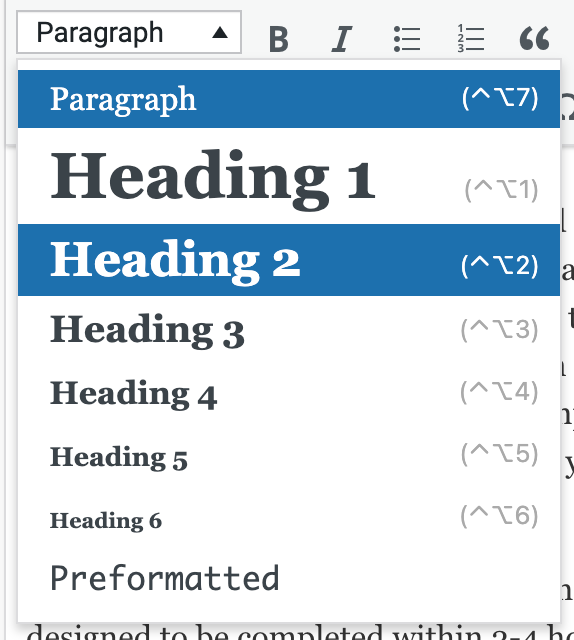
Breaking up large paragraphs makes them easier to read to, which is probably why Google prefers this. After all, it's mimicking what a human wants to improve its results.
So if you have a large article like this one, put headings and sections in it to make it easier to read. This also means that if someone is after a specific piece of information that can scan down the page.
If you're writing from Microsoft Word first, here's how to put those headings in Microsoft Word - Add a heading
Keywords
As mentioned above, Google is mimicking a human to make its results much more useful. So DON’T try and keyword stuff in your pages so that your page sounds weird. Google knows! If it flows well to read (remember to read out loud or get someone to check it) then it’s fine. Yoast will give you a traffic light score, remember that this is just a guide. You are selling to humans. I can’t stress that enough! If you’ve included keywords and phrases in your article, it reads nicely, it’s informative and it’s useful and Yoast still says ‘nope’, ignore it. You’ve done your job. If you’re not sure, get a second opinion from people who are honest and not prone to saying everything is fine, get a constructive opinion.
Write at least twice a month if you can. Quality over quantity!
If you think it’s a lot of effort, remember the old days before the internet when you went to buy a telly. You’d have a long conversation with the shop assistant who answered all your questions. If you felt they didn’t know what they were talking about or something didn’t inspire confidence, you’d go elsewhere. Well, now you only have to answer the most common customer once in one article while you do not even face to face with the customer. Although you’ll have lots of conversations online being able to show your authority in your field and give potential customers all the convincing they need to buy. That brings me on to calls to action.
Calls to action
It’s no good having a piece of awesome content, then your reader gets to the end and thinks ‘that’s nice’ then buys from your competitor. Have a big obvious button to press that goes to the contact form, or dials a phone number. If it’s a text link it can be hard to see, so make it all buttony’ Have a read of Calls to action, why you need clicky buttons!
What can I write?
Here are some ideas:
- FAQs - list some common questions you often get asked, this is a great way to get content that includes what people are searching for.
- Knowledge base - explain stuff that helps your customers. Again this builds up content that people search for and authority
- Common myths - what common myths are there about your industry or your business, this gives you a way to express your USP. One of ours is ‘you can’t have your domain name, email address and website hosting with different companies’ you actually can. So add stuff that people can get confused over.
- Seasonal - do you look after animals? Remember to post something about keeping pets inside due to the noise of fireworks. People love to share stuff that will help and is seasonal. If you sell chocolates OMG don’t miss ANY Christmas opportunity to post stuff!
- Along with seasonal, news worthy trending stuff - is the Football World Cup on? Don’t forget to post something about football!
- What will your customers find useful - do you make custom wellington boots? How about a ‘how to care for your wellington boots’ type blog
- Milestones, achievements and awards - us British aren’t very good at blowing our own trumpets. So who else will? If you’ve won an award write all about it and what it means to you!
Stack 'em up
If you get large gaps of time free, then you are rushed off your feet. Then write your blog posts in advance and set them to publish in the future. You can set the date in WordPress posts to do this. If you’re super efficient, you could write a year's worth of blog posts and set them all to publish on the right dates and chill for the whole year feeling very smug.
Pasting from Word, Pages or other word processing program
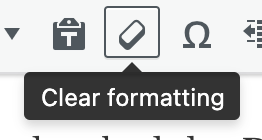
These processing programs can add extra formatting that needs to be removed or it may interfere with the font that is set in the style sheet and have layout issues. To remove formatting. Use the rubber to wipe anything out that shouldn’t be there:
Spelling and grammar
Just like a teacher Google will mark you down if your spelling and grammar aren’t good, or even if it’s badly written. Don’t just spellcheck, get someone to check it for you!
Oh, the irony if I have a spelling or grammatical error in this, do let us know here, contact us.
Avoid duplicate content
Google hates pages with the same content, and even worse content copied from other sites, it will see which is older and add preference to that one in the listings and maybe delist the other.
Page titles
Don’t have more than one page with the same page title.
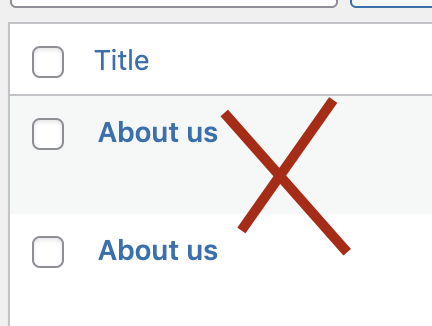
This is difficult if you’re running the same event again and again a few days later, to differentiate these, add the date in the title, or if it’s at different venues add that in the title instead.
Avoid duplicate meta title and descriptions
If you’re not sure what meta tags are, click here for an explanation: What are Meta Tags and how do they help my website
You don’t want duplicate meta tags, as these help differentiate your page in the SERPs (Search Engine Results pages) and may affect your rankings in Google.
If you’ve set up Yoast (in Search Appearance) to use the page title or in the meta title and description then if you have different page titles that should remove the possibility of duplicate meta tags.
Meta Tag title
Have no more than 60 characters, as these get cut off in the search results.
Meta Tag description
Have no more than 160 characters as these get cut off in the search results.
Social media
Google finds what you post on social media. So make sure your company details are up-to-date on Facebook, Linkedin and Twitter. These do help you to get found in the SERPs as do your posts.
Images
If you have images in the body of the text, align them right, rather than left, it doesn’t interrupt the flow of reading then, and people can look at the images as they go.
File names
Just like the alt tag we explore below, make sure your image file names explain what the image is, so 9wuer9w8eur.jpg isn’t as good as my-awesome-green-wellington-boots.jpg.
DO NOT have spaces or odd characters like this in your file names ! @ £ $ % ^ & * ( ) _ + { } | ” : < >. - are ok so, these are both good:
My-awesome-green-wellington-boots.jpg
Myawesomegreenwellingtonboots.jpg
ALT Tags
Or alternative text, it’s REALLY important to add a few descriptive words (up to 5 as a guide). Anywhere you see this:

Fill it in, you can add these to the images already in the site, by clicking the edit button on the images:

Links
Make all URLs into links, no one is going to copy and paste a price of text into their browser, it’s also terrible SEO.
The link name gives Google an idea of what a link is about, so a click here just won't do, it can be a click here to learn more about wellington boots
To make it into a link, highlight the text and click the link button above:

We’ll make the text before it the link text (sometimes called anchor text in SEO) So this is really what we’re going to do:
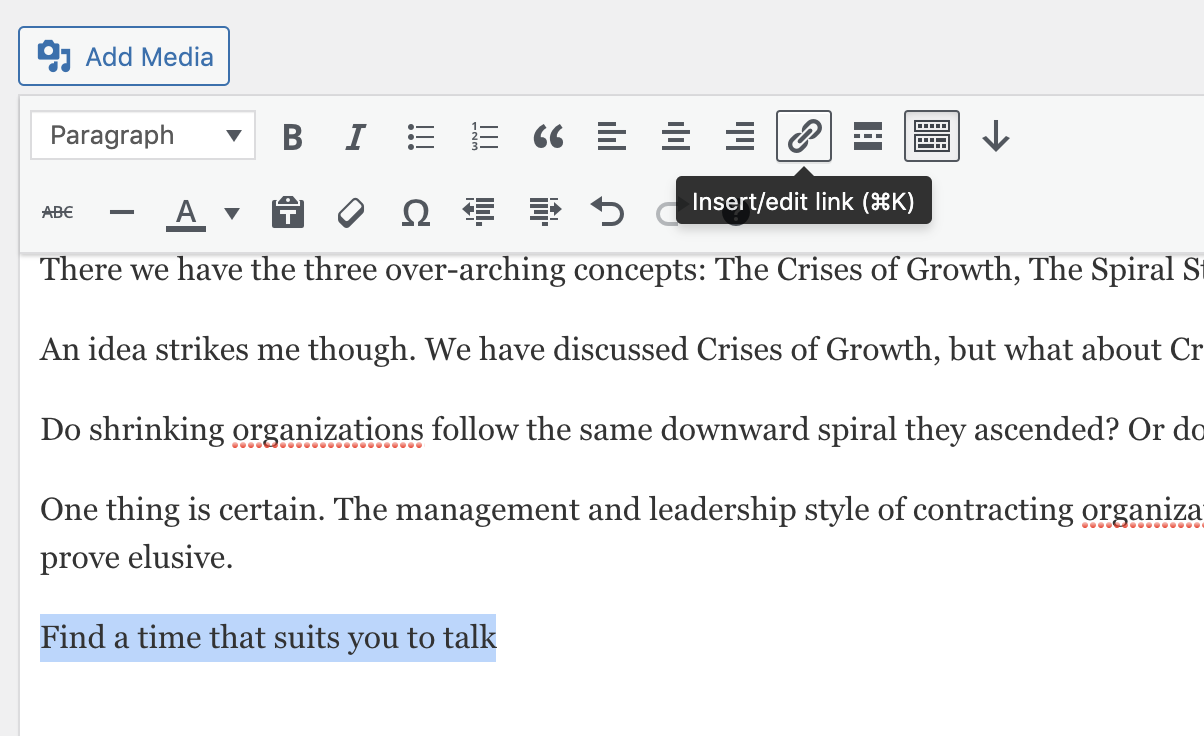
And paste in that URL:
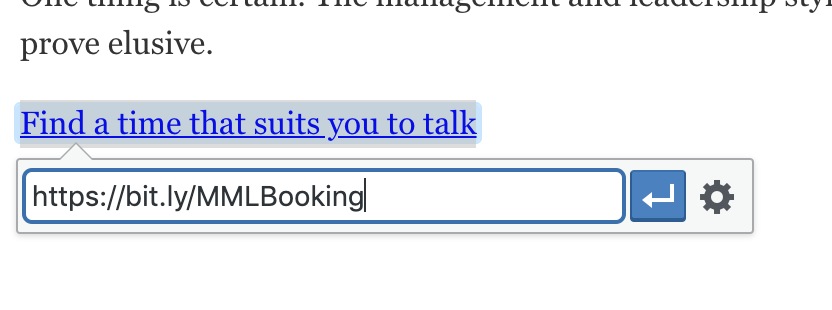
Click the blue arrow button and Save to make that live.
Google and search
In a nutshell, write for humans and prove what you know. Any specialism means no one is going to read all of your posts and become the expert you are. You can learn to drive by reading a book but you will get an idea the author knows what they’re talking about.
So be generous with your content and when people realise how much there is to your industry they’ll get you to do it for them!